Basic Point Forecasting with Flexible TemporalFusionTransformer
This example demonstrates how to train the flexible
TemporalFusionTransformer
for a basic single-step, point forecasting task. We will use only
dynamic (past observed) features for simplicity.
The workflow includes:
Generating simple synthetic time series data.
Preparing input sequences and targets using the
create_sequences()utility.Defining and compiling a TemporalFusionTransformer model configured for point forecasting.
Training the model for a few epochs.
Making a sample prediction and visualizing the results.
Prerequisites
Ensure you have fusionlab-learn and its dependencies installed:
pip install fusionlab-learn matplotlib
Step 1: Imports and Setup
We import standard libraries and the necessary components from
fusionlab.
 1import numpy as np
 2import pandas as pd
 3import tensorflow as tf
 4import matplotlib.pyplot as plt
 5import warnings
 6import os
 7
 8# FusionLab imports
 9from fusionlab.nn.transformers import TemporalFusionTransformer
10from fusionlab.nn.utils import create_sequences
11# Import loss for Keras to recognize if model was saved with it
12from fusionlab.nn.losses import combined_quantile_loss
13
14# Suppress warnings and TF logs for cleaner output
15warnings.filterwarnings('ignore')
16tf.get_logger().setLevel('ERROR')
17if hasattr(tf, 'autograph'): # Check for autograph availability
18    tf.autograph.set_verbosity(0)
19
20print("Libraries imported and TensorFlow logs configured.")
Step 2: Generate Synthetic Data
A simple sine wave with added noise is created to serve as our univariate time series data.
1time = np.arange(0, 100, 0.1)
2amplitude = np.sin(time) + np.random.normal(
3    0, 0.15, len(time)
4    )
5df = pd.DataFrame({'Value': amplitude})
6print(f"Generated data shape: {df.shape}")
7print("Sample of generated data:")
8print(df.head())
Step 3: Prepare Sequences
The create_sequences() function transforms
the flat time series into input-output pairs suitable for supervised
learning. We’ll use the past 10 steps to predict the single next step.
 1sequence_length = 10    # Lookback window
 2forecast_horizon = 1    # Predict 1 step ahead (point forecast)
 3target_col_name = 'Value'
 4
 5sequences, targets = create_sequences(
 6    df=df,
 7    sequence_length=sequence_length,
 8    target_col=target_col_name,
 9    forecast_horizon=forecast_horizon,
10    verbose=0 # Suppress output from create_sequences
11)
12
13# Ensure data types are float32 for TensorFlow
14sequences = sequences.astype(np.float32)
15# Reshape targets for Keras: (Samples, Horizon, OutputDim=1)
16# OutputDim is 1 because we predict one target variable ('Value')
17targets = targets.reshape(
18    -1, forecast_horizon, 1).astype(np.float32)
19
20print(f"\nInput sequences shape (X): {sequences.shape}")
21print(f"Target values shape (y): {targets.shape}")
22# Example output:
23# Input sequences shape (X): (990, 10, 1)
24# Target values shape (y): (990, 1, 1)
Step 4: Define and Compile TFT Model
We instantiate the flexible TemporalFusionTransformer. Since we are only using dynamic features, static_input_dim and future_input_dim will be None (their default values). For point forecasting, quantiles is set to None.
 1# Get the number of features from the prepared sequences
 2num_dynamic_features = sequences.shape[-1]
 3
 4model = TemporalFusionTransformer(
 5    dynamic_input_dim=num_dynamic_features,
 6    # static_input_dim defaults to None
 7    # future_input_dim defaults to None
 8    forecast_horizon=forecast_horizon,
 9    output_dim=1, # Predicting a single value per step
10    hidden_units=16,        # Smaller for faster demo
11    num_heads=2,            # Fewer heads for faster demo
12    quantiles=None,         # Key for point forecasting
13    num_lstm_layers=1,      # Example: 1 LSTM layer
14    lstm_units=16           # Example: LSTM units
15)
16print("\nFlexible TemporalFusionTransformer instantiated for point forecast.")
17
18# Compile the model with Mean Squared Error for point forecasting
19model.compile(optimizer='adam', loss='mse')
20print("Model compiled successfully with MSE loss.")
Step 5: Train the Model
The TemporalFusionTransformer expects inputs as a list of three elements: [static_inputs, dynamic_inputs, future_inputs]. Since we are only using dynamic inputs, the static and future inputs will be None.
 1# Prepare inputs for the model's fit method
 2# Order: [Static, Dynamic, Future] # since Static and Future are None
 3# we can pass only Dynamic, TFTFlex will handle it.
 4train_inputs = [sequences]
 5
 6print("\nStarting model training (few epochs for demo)...")
 7history = model.fit(
 8    train_inputs, # Pass the 3-element list
 9    targets,      # Shape (Samples, Horizon, OutputDim)
10    epochs=5,     # Increase for actual training
11    batch_size=32,
12    validation_split=0.2, # Keras uses last 20% for validation
13    verbose=1             # Show training progress
14)
15print("Training finished.")
16if history and history.history.get('val_loss'):
17    print(f"Final validation loss: {history.history['val_loss'][-1]:.4f}")
Step 6: Make and Visualize Predictions
We’ll use a sample from the validation set to make a prediction and then plot the predictions against actual values.
 1# Prepare validation data for prediction
 2# Keras validation_split takes from the end of the data
 3num_samples = sequences.shape[0]
 4val_start_idx = int(num_samples * (1 - 0.2))
 5
 6val_dynamic_inputs = sequences[val_start_idx:]
 7val_actuals_for_plot = targets[val_start_idx:]
 8
 9# Package validation inputs in the [Dynamic] format since Static, and Future are None
10val_inputs_list_for_plot = [val_dynamic_inputs]
11
12print("\nMaking predictions on the validation set...")
13val_predictions_scaled = model.predict(val_inputs_list_for_plot, verbose=0)
14# val_predictions_scaled shape: (NumValSamples, Horizon, OutputDim)
15
16print(f"Validation predictions shape: {val_predictions_scaled.shape}")
17print("Sample prediction (first validation sample, first step):",
18      val_predictions_scaled[0, 0, 0])
19
20# --- Visualization ---
21# Align time axis for plotting
22# The target for sequence `i` corresponds to data point `time[i + sequence_length]`
23# The validation data starts at `val_start_idx` in the `sequences` array.
24plot_val_time_axis = time[
25    val_start_idx + sequence_length : \
26    val_start_idx + sequence_length + len(val_actuals_for_plot)
27    ]
28
29# Ensure plot_val_time_axis has the same length as predictions/actuals
30# This can happen if len(val_actuals_for_plot) is small
31num_plot_points = min(len(plot_val_time_axis), len(val_actuals_for_plot))
32
33plt.figure(figsize=(14, 7))
34# Plot a portion of original data for context
35context_end_idx = val_start_idx + sequence_length + num_plot_points
36plt.plot(time[:context_end_idx], amplitude[:context_end_idx],
37         label='Original Data Context', alpha=0.6, color='lightblue')
38
39# Plot actuals from validation set (first horizon step, first output dim)
40plt.plot(plot_val_time_axis[:num_plot_points],
41         val_actuals_for_plot[:num_plot_points, 0, 0],
42         label=f'Actual Validation Data (H=1)',
43         linestyle='--', marker='o', color='cyan')
44
45# Plot predictions on validation set (first horizon step, first output dim)
46plt.plot(plot_val_time_axis[:num_plot_points],
47         val_predictions_scaled[:num_plot_points, 0, 0],
48         label=f'Predicted Validation Data (H=1)',
49         marker='D', color='orange', linestyle =':')
50
51plt.title('Flexible TFT Point Forecast (Dynamic Input Only)')
52plt.xlabel('Time')
53plt.ylabel('Value')
54plt.legend()
55plt.grid(True)
56plt.tight_layout()
57# To save the figure:
58# fig_path = os.path.join(output_dir_tft, "basic_tft_point_forecast.png")
59# plt.savefig(fig_path)
60# print(f"Plot saved to {fig_path}")
61plt.show() # Display plot
62
63print("\nBasic TFT point forecasting example complete.")
Example Output Plot:
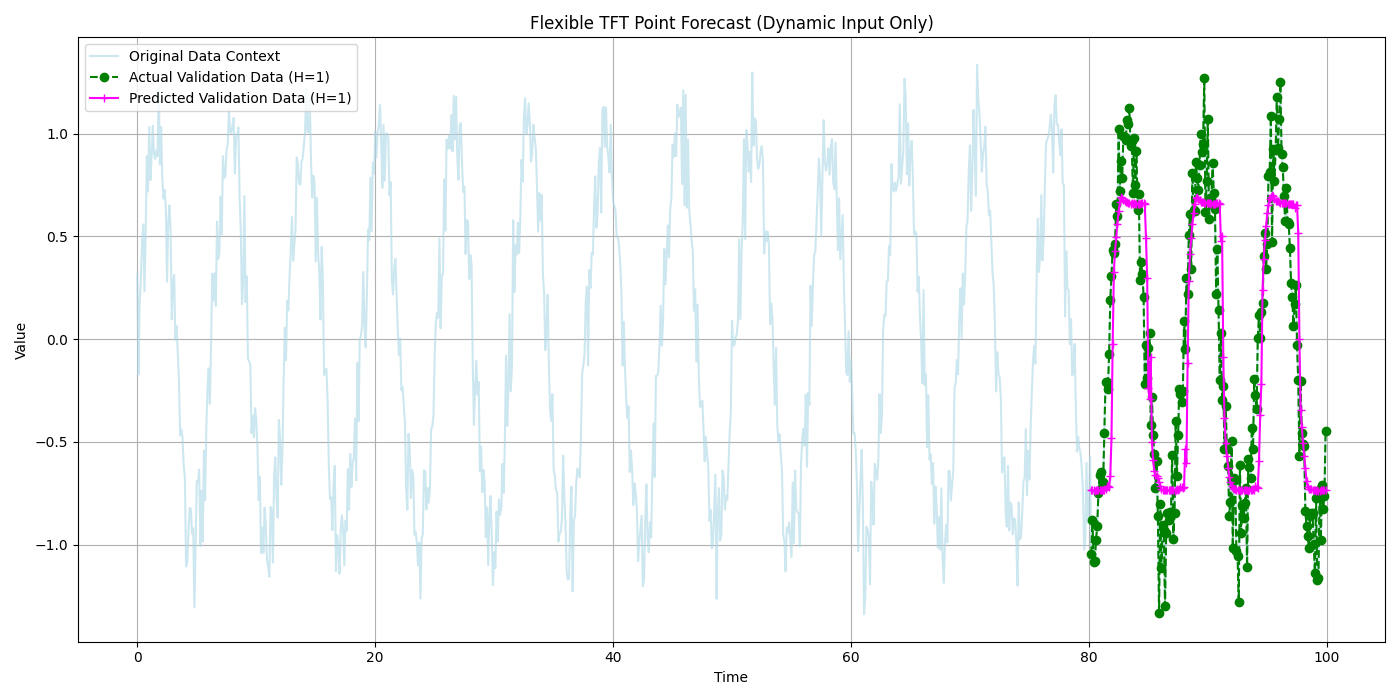
Visualization of the point forecast against actual validation data.