Exercise: Forecasting with a Pure Transformer
Welcome to this exercise on using the
TimeSeriesTransformer. This guide
will walk you through the complete process of building and training a
pure transformer model for a multi-horizon, probabilistic time series
forecasting task.
We will focus on demonstrating the model’s ability to handle multiple input types (static, dynamic, and future) and to generate quantile forecasts that capture prediction uncertainty.
Learning Objectives:
Generate a synthetic time series dataset with static, dynamic past, and known future features.
Prepare and shape the data into the list format required by the model:
[static_data, dynamic_data, future_data].Instantiate the
TimeSeriesTransformerand configure it for probabilistic (quantile) forecasting.Implement a custom quantile loss function and compile the model.
Train the model and visualize the results, including the forecast distribution and uncertainty bounds.
Let’s get started!
Prerequisites
Ensure you have fusionlab-learn and its common dependencies
installed.
pip install fusionlab-learn matplotlib scikit-learn
TimeSeriesTransformer
Step 1: Imports and Setup
First, we import all necessary libraries and set up our environment.
 1import os
 2import numpy as np
 3import tensorflow as tf
 4import matplotlib.pyplot as plt
 5
 6# FusionLab imports
 7from fusionlab.nn.transformers import TimeSeriesTransformer
 8
 9# Suppress warnings and TF logs for cleaner output
10import warnings
11warnings.filterwarnings('ignore')
12tf.get_logger().setLevel('ERROR')
13
14# Directory for saving any output images
15EXERCISE_OUTPUT_DIR = "./pure_transformer_exercise_outputs"
16os.makedirs(EXERCISE_OUTPUT_DIR, exist_ok=True)
17
18print("Libraries imported and setup complete.")
Expected Output:
Libraries imported and setup complete.
Step 2: Generate and Prepare Synthetic Data
We’ll create a synthetic dataset and shape it into the three arrays
required by the TimeSeriesTransformer: static, dynamic past, and
known future features.
 1# Configuration
 2N_SAMPLES = 1000
 3PAST_STEPS = 30
 4HORIZON = 12
 5STATIC_DIM, DYNAMIC_DIM, FUTURE_DIM = 3, 4, 2
 6SEED = 42
 7np.random.seed(SEED)
 8tf.random.set_seed(SEED)
 9
10# --- Generate Dummy Data Arrays ---
11static_features = np.random.randn(N_SAMPLES, STATIC_DIM)
12dynamic_features = np.random.randn(N_SAMPLES, PAST_STEPS, DYNAMIC_DIM)
13future_features = np.random.randn(N_SAMPLES, HORIZON, FUTURE_DIM)
14
15# Create a simple target based on one of the dynamic features
16targets = np.roll(dynamic_features[:, :, 0], -HORIZON, axis=1)[:, :HORIZON, np.newaxis] \
17          + np.random.randn(N_SAMPLES, HORIZON, 1) * 0.5
18
19# Split data into training and validation sets
20val_split = -100
21train_inputs = [arr[:val_split] for arr in [static_features, dynamic_features, future_features]]
22val_inputs = [arr[val_split:] for arr in [static_features, dynamic_features, future_features]]
23train_targets, val_targets = targets[:val_split], targets[val_split:]
24
25print("Generated data shapes:")
26print(f"  Training Inputs (static, dynamic, future): "
27      f"{[x.shape for x in train_inputs]}")
28print(f"  Training Targets: {train_targets.shape}")
Expected Output:
Generated data shapes:
  Training Inputs (static, dynamic, future): [(900, 3), (900, 30, 4), (900, 12, 2)]
  Training Targets: (900, 12, 1)
Step 3: Define, Compile, and Train the Model
Now, we instantiate the TimeSeriesTransformer. We will configure it
for probabilistic forecasting by setting the quantiles parameter.
This requires a corresponding quantile loss function for training.
 1# Define quantiles for probabilistic forecast
 2output_quantiles = [0.05, 0.5, 0.95] # p5, p50 (median), p95
 3
 4# Instantiate the model
 5model = TimeSeriesTransformer(
 6    static_input_dim=STATIC_DIM,
 7    dynamic_input_dim=DYNAMIC_DIM,
 8    future_input_dim=FUTURE_DIM,
 9    output_dim=1,
10    forecast_horizon=HORIZON,
11    quantiles=output_quantiles,
12    embed_dim=32,
13    num_heads=4,
14    ffn_dim=64,
15    num_encoder_layers=2,
16    num_decoder_layers=2
17)
18
19# Define a quantile loss function
20def quantile_loss(y_true, y_pred):
21    q = tf.constant(np.array(output_quantiles), dtype=tf.float32)
22    e = y_true - y_pred
23    # The tilted absolute loss function
24    return tf.keras.backend.mean(
25        tf.keras.backend.maximum(q * e, (q - 1) * e), axis=-1
26    )
27
28# Compile the model with the custom loss
29model.compile(optimizer="adam", loss=quantile_loss)
30
31# Train the model
32print("\nStarting TimeSeriesTransformer training...")
33history = model.fit(
34    train_inputs,
35    train_targets,
36    validation_data=(val_inputs, val_targets),
37    epochs=15,
38    batch_size=128,
39    verbose=0
40)
41print("Training complete.")
42print(f"Final validation loss: {history.history['val_loss'][-1]:.4f}")
Expected Output:
Starting TimeSeriesTransformer training...
Training complete.
Final validation loss: 0.4041
Step 4: Visualize the Probabilistic Forecast
The key advantage of a quantile forecast is the ability to visualize uncertainty. We will plot the median prediction (p50) as our main forecast and shade the area between the lower (p5) and upper (p95) quantiles to represent the 90% prediction interval.
 1# Make predictions on the validation set
 2val_preds = model.predict(val_inputs)
 3
 4# Select a single sequence from the validation set to plot
 5idx_to_plot = 25
 6median_pred = val_preds[idx_to_plot, :, 1] # 0.5 quantile is at index 1
 7lower_bound = val_preds[idx_to_plot, :, 0] # 0.05 quantile is at index 0
 8upper_bound = val_preds[idx_to_plot, :, 2] # 0.95 quantile is at index 2
 9actuals = val_targets[idx_to_plot, :, 0]
10
11# --- Visualization ---
12plt.figure(figsize=(12, 6))
13time_axis = range(HORIZON)
14
15# Plot uncertainty bounds
16plt.fill_between(
17    time_axis, lower_bound, upper_bound,
18    color='orange', alpha=0.3, label='90% Prediction Interval'
19)
20# Plot actuals and median forecast
21plt.plot(time_axis, actuals, 'o--', color='blue', label='Actual Values')
22plt.plot(time_axis, median_pred, 'x-', color='red', label='Median Forecast (p50)')
23
24plt.title('Probabilistic Forecast vs. Actuals (Validation Sample)')
25plt.xlabel(f'Forecast Step (Horizon = {HORIZON} steps)')
26plt.ylabel('Value')
27plt.legend()
28plt.grid(True, linestyle=':')
29plt.tight_layout()
30plt.show()
Expected Plot:
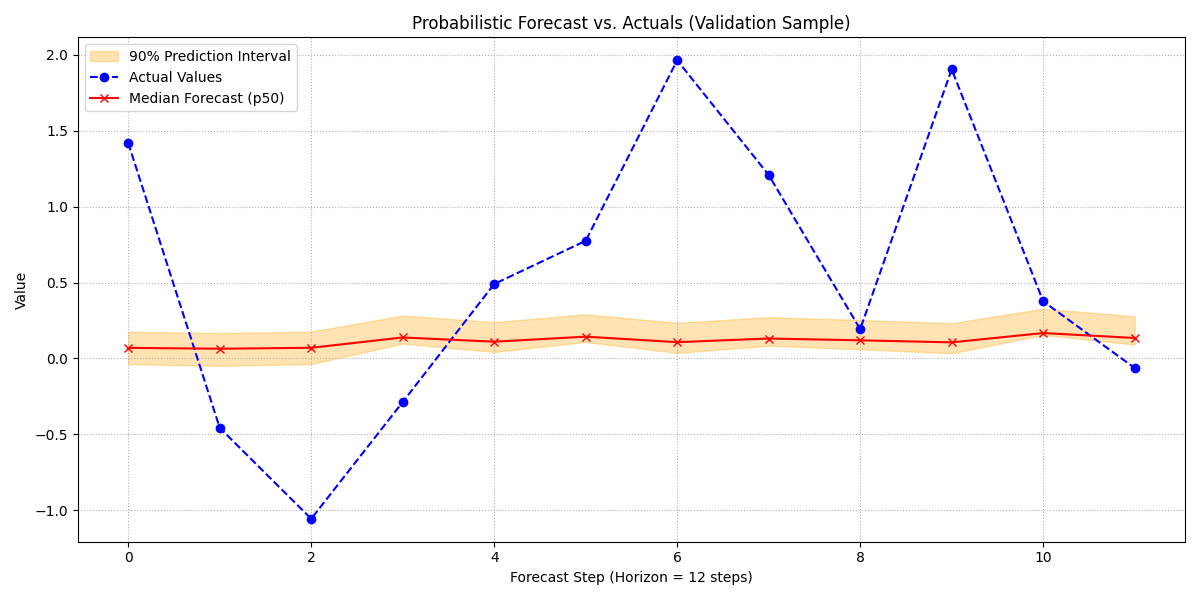
A plot showing the actual values, the median forecast, and the shaded 90% prediction interval. This visualizes not just what the model predicts, but also its confidence in that prediction.
Discussion of Exercise
Congratulations! You have successfully trained a pure transformer model for a complex, probabilistic forecasting task. In this exercise, you have learned to:
- Prepare data into the three-part list format (`[static, dynamic,
future]`) required by the
TimeSeriesTransformer.
- Configure the model to output quantile predictions for estimating
uncertainty.
Implement and use a custom quantile loss function for training.
- Visualize a probabilistic forecast, clearly showing the prediction
interval around the median forecast.
This workflow demonstrates the power of pure attention-based models for capturing long-range dependencies and providing rich, uncertainty- aware forecasts.