Advanced Forecasting with XTFT
This example demonstrates using the more advanced
XTFT model for a multi-step quantile
forecasting task. XTFT is designed to handle complex scenarios involving
static features (e.g., item ID, location attributes), dynamic
historical features (e.g., past sales, sensor readings), and known
future inputs (e.g., planned promotions, future calendar events).
We will walk through the process step-by-step:
Generate synthetic multi-variate time series data for multiple items.
Define static, dynamic, future, and target features.
Scale numerical features.
Use the
reshape_xtft_data()utility to prepare sequences suitable for XTFT.Split the data into training and validation sets.
Define and compile an XTFT model with quantile outputs.
Train the model.
Make predictions and inverse transform them.
Visualize the quantile predictions for a sample item.
Prerequisites
Ensure you have fusionlab-learn and its dependencies installed:
pip install fusionlab-learn matplotlib scikit-learn joblib
Step 1: Imports and Setup
First, we import the necessary libraries, including TensorFlow, Pandas,
NumPy, scikit-learn for scaling, Matplotlib for plotting, and the
required components from fusionlab. We also suppress common
warnings and logs for cleaner output.
 1import numpy as np
 2import pandas as pd
 3import tensorflow as tf
 4import matplotlib.pyplot as plt
 5from sklearn.model_selection import train_test_split
 6from sklearn.preprocessing import StandardScaler
 7import os
 8import joblib # For saving/loading scalers
 9
10# FusionLab imports
11from fusionlab.nn.transformers import XTFT
12from fusionlab.nn.utils import reshape_xtft_data
13from fusionlab.nn.losses import combined_quantile_loss
14
15# Suppress warnings and TF logs for cleaner output
16import warnings
17warnings.filterwarnings('ignore')
18tf.get_logger().setLevel('ERROR')
19if hasattr(tf, 'autograph'): # Check for autograph availability
20    tf.autograph.set_verbosity(0)
21
22# Configuration for outputs
23output_dir_xtft = "./xtft_advanced_example_output"
24os.makedirs(output_dir_xtft, exist_ok=True)
25
26print("Libraries imported and TensorFlow logs configured.")
Step 2: Generate Synthetic Data
We create a sample dataset simulating monthly sales for multiple items over several years. This dataset includes static features (ItemID), dynamic features (Month, Temperature, PrevMonthSales), known future features (PlannedPromotion), and the target (Sales).
 1n_items = 3
 2n_timesteps = 36 # 3 years of monthly data
 3rng_seed = 42
 4np.random.seed(rng_seed) # For reproducibility
 5
 6date_rng = pd.date_range(
 7    start='2020-01-01', periods=n_timesteps, freq='MS' # Month Start
 8    )
 9df_list = []
10
11for item_id in range(n_items):
12    time_idx = np.arange(n_timesteps)
13    # Base sales with trend, seasonality, and item-specific factor
14    sales = (
15        100 + item_id * 50 + time_idx * (2 + item_id * 0.5) +
16        20 * np.sin(2 * np.pi * time_idx / 12) + # Yearly seasonality
17        np.random.normal(0, 10, n_timesteps) # Noise
18    )
19    # Simulated temperature (dynamic)
20    temp = (15 + 10 * np.sin(2 * np.pi * (time_idx % 12) / 12 + np.pi) +
21            np.random.normal(0, 2, n_timesteps))
22    # Simulated planned promotion (future known)
23    promo = np.random.randint(0, 2, n_timesteps)
24
25    item_df = pd.DataFrame({
26        'Date': date_rng,
27        'ItemID': f'item_{item_id}', # String ItemID for grouping
28        'Month': date_rng.month,     # Can be dynamic & future
29        'Temperature': temp,
30        'PlannedPromotion': promo,
31        'Sales': sales
32    })
33    # Create lagged sales (dynamic history)
34    item_df['PrevMonthSales'] = item_df['Sales'].shift(1)
35    df_list.append(item_df)
36
37df_raw = pd.concat(df_list).dropna().reset_index(drop=True)
38print(f"Generated raw data shape: {df_raw.shape}")
39print("Sample of generated data:")
40print(df_raw.head())
Step 3: Define Features and Scale Numerics
We explicitly define which columns correspond to static, dynamic past, known future, and target roles. Numerical features are scaled using StandardScaler. The scaler for the target variable is stored for later inverse transformation of predictions.
 1target_col = 'Sales'
 2dt_col = 'Date' # Datetime column for reshaping
 3# ItemID is the primary static identifier for grouping
 4static_cols = ['ItemID']
 5# Dynamic features: Month, Temperature, and lagged sales
 6dynamic_cols = ['Month', 'Temperature', 'PrevMonthSales']
 7# Future features: Planned promotions and Month (known ahead)
 8future_cols = ['PlannedPromotion', 'Month']
 9# Column for grouping sequences by item
10spatial_cols = ['ItemID']
11
12# Scale numerical features (excluding ItemID, Month, PlannedPromotion)
13# Target 'Sales' is also scaled.
14scalers = {} # To store scalers for different columns
15num_cols_to_scale = ['Temperature', 'PrevMonthSales', 'Sales']
16
17df_scaled = df_raw.copy()
18for col in num_cols_to_scale:
19    if col in df_scaled.columns:
20        scaler = StandardScaler()
21        df_scaled[col] = scaler.fit_transform(df_scaled[[col]])
22        scalers[col] = scaler # Store the fitted scaler
23        print(f"Scaled column: {col}")
24    else:
25        print(f"Warning: Column '{col}' not found for scaling.")
26
27# Save scalers (important for inference)
28scalers_path = os.path.join(output_dir_xtft, "xtft_scalers.joblib")
29joblib.dump(scalers, scalers_path)
30print(f"\nScalers saved to {scalers_path}")
Step 4: Prepare Sequences using reshape_xtft_data
The reshape_xtft_data() utility transforms
the processed DataFrame into the specific input arrays required by XTFT.
It creates rolling windows, groups by spatial_cols (ItemID), and
separates features into static, dynamic, future, and target arrays.
 1time_steps = 12         # Use 1 year of history as lookback
 2forecast_horizons = 6   # Predict next 6 months
 3
 4# Note: 'ItemID' (string) needs to be numerically encoded if used
 5# directly as a feature by the model's embedding layers.
 6# For reshape_xtft_data, it's used for grouping. If also a static
 7# feature, ensure it's numerical or handle encoding before this step.
 8# Here, we assume the model's VSN/Embedding can handle integer IDs if
 9# 'ItemID' was label encoded and passed in static_cols.
10# For simplicity, we'll assume ItemID is handled by grouping and not
11# directly as a numerical static feature in this step, unless label encoded.
12# If ItemID is to be a feature, it should be label encoded first.
13# For this example, we'll use a placeholder if ItemID is not numeric.
14# A more robust approach would be to LabelEncode 'ItemID' before this.
15
16# Let's ensure static_cols passed to reshape_xtft_data are numeric
17# If ItemID is the only static col and it's string, pass empty list or encoded.
18# For this example, let's assume no additional static *features* besides grouping.
19# If you had other numerical static features, list them.
20processed_static_cols = [] # Example: if ItemID is only for grouping
21# If ItemID were label encoded:
22df_scaled['ItemID_Encoded'] = LabelEncoder().fit_transform(df_scaled['ItemID'])
23processed_static_cols = ['ItemID_Encoded']
24
25static_data, dynamic_data, future_data, target_data = reshape_xtft_data(
26    df=df_scaled,
27    dt_col=dt_col,
28    target_col=target_col,
29    dynamic_cols=dynamic_cols,
30    static_cols=processed_static_cols, # Pass empty or encoded static features
31    future_cols=future_cols,
32    spatial_cols=spatial_cols, # Group by ItemID
33    time_steps=time_steps,
34    forecast_horizons=forecast_horizons,
35    verbose=1 # Show resulting shapes
36)
37# target_data from reshape_xtft_data is (N, H, 1)
Step 5: Train/Validation Split of Sequences
The generated sequence arrays are split into training and validation sets. A simple chronological split on the sequences is used here. Inputs for the model are packaged into lists in the order [static, dynamic, future].
 1val_split_fraction = 0.2
 2# Check if any data was generated
 3if target_data is None or target_data.shape[0] == 0:
 4    raise ValueError("No sequences were generated. Check data and parameters.")
 5
 6n_samples = target_data.shape[0]
 7split_idx = int(n_samples * (1 - val_split_fraction))
 8
 9# Handle cases where static_data might be None
10X_train_static = static_data[:split_idx] if static_data is not None else None
11X_val_static = static_data[split_idx:] if static_data is not None else None
12
13X_train_dynamic, X_val_dynamic = dynamic_data[:split_idx], dynamic_data[split_idx:]
14X_train_future, X_val_future = future_data[:split_idx], future_data[split_idx:]
15y_train, y_val = target_data[:split_idx], target_data[split_idx:]
16
17train_inputs = [X_train_static, X_train_dynamic, X_train_future]
18val_inputs = [X_val_static, X_val_dynamic, X_val_future]
19
20print(f"\nData split into Train/Validation sequences:")
21print(f"  Train samples: {len(y_train)}")
22print(f"  Validation samples: {len(y_val)}")
Step 6: Define XTFT Model for Quantile Forecast
Instantiate the XTFT model. Input dimensions are
derived from the prepared data arrays. Configure for quantile forecasting
and set relevant XTFT hyperparameters.
 1quantiles_to_predict = [0.1, 0.5, 0.9]
 2output_dim_model = 1 # Predicting univariate 'Sales'
 3
 4# Determine input dimensions for the model
 5s_dim = X_train_static.shape[-1] if X_train_static is not None else 0
 6d_dim = X_train_dynamic.shape[-1]
 7f_dim = X_train_future.shape[-1] if X_train_future is not None else 0
 8
 9model = XTFT(
10    static_input_dim=s_dim,
11    dynamic_input_dim=d_dim,
12    future_input_dim=f_dim,
13    forecast_horizon=forecast_horizons,
14    quantiles=quantiles_to_predict,
15    output_dim=output_dim_model,
16    # Example XTFT Hyperparameters (these should be tuned)
17    embed_dim=16,
18    lstm_units=32,
19    attention_units=16,
20    hidden_units=32,
21    num_heads=2, # Reduced for speed
22    dropout_rate=0.1,
23    max_window_size=time_steps, # Can be different from time_steps
24    memory_size=20, # Reduced for speed
25    scales=[1, 3]   # Example multi-scale config
26)
27print("\nXTFT model instantiated for quantile forecast.")
Step 7: Compile and Train the Model
Compile the model with an Adam optimizer and the
combined_quantile_loss(). Train for a few
epochs for this demonstration.
 1loss_fn = combined_quantile_loss(quantiles=quantiles_to_predict)
 2model.compile(
 3    optimizer=tf.keras.optimizers.Adam(learning_rate=0.005),
 4    loss=loss_fn
 5    )
 6print("XTFT model compiled with quantile loss.")
 7
 8# Dummy call to build model and print summary (optional)
 9# Ensure inputs are correctly structured (list of 3, Nones allowed if dims are 0)
10dummy_s = tf.zeros((1, s_dim)) if s_dim > 0 else None
11dummy_d = tf.zeros((1, time_steps, d_dim))
12dummy_f = tf.zeros((1, time_steps + forecast_horizons, f_dim)) if f_dim > 0 else None
13# model([dummy_s, dummy_d, dummy_f])
14# model.summary(line_length=100)
15
16
17print("\nStarting XTFT model training (few epochs for demo)...")
18history = model.fit(
19    train_inputs, # List [Static, Dynamic, Future]
20    y_train,      # Targets
21    validation_data=(val_inputs, y_val),
22    epochs=5,     # Increase for real training
23    batch_size=16,  # Adjust based on memory and dataset size
24    verbose=1
25)
26print("Training finished.")
27if history and history.history.get('val_loss'):
28    print(f"Final validation loss: {history.history['val_loss'][-1]:.4f}")
Step 8: Make Predictions and Inverse Transform
Use the trained model to predict on the validation set. Then, inverse transform the scaled predictions and actuals back to their original units.
 1print("\nMaking quantile predictions on validation set...")
 2predictions_scaled = model.predict(val_inputs, verbose=0)
 3# Shape: (NumValSamples, Horizon, NumQuantiles) if output_dim=1
 4
 5# Inverse Transform Predictions and Actuals
 6# We need the scaler for the 'Sales' (target) column
 7target_scaler = scalers.get(target_col)
 8if target_scaler is None:
 9    print("Warning: Target scaler not found. Plotting scaled values.")
10    predictions_final = predictions_scaled
11    y_val_final = y_val
12else:
13    num_val_samples = X_val_static.shape[0] if X_val_static is not None else X_val_dynamic.shape[0]
14    num_q = len(quantiles_to_predict)
15
16    # Reshape for scaler: (Samples*Horizon, Quantiles/OutputDim)
17    pred_reshaped = predictions_scaled.reshape(-1, num_q * output_dim_model)
18    # If output_dim_model > 1, inverse_transform needs care.
19    # Assuming output_dim_model = 1 for simplicity here.
20    if output_dim_model == 1:
21        predictions_inv = target_scaler.inverse_transform(pred_reshaped)
22        predictions_final = predictions_inv.reshape(
23            num_val_samples, forecast_horizons, num_q
24        )
25        # Inverse transform actuals
26        y_val_reshaped = y_val.reshape(-1, output_dim_model)
27        y_val_inv = target_scaler.inverse_transform(y_val_reshaped)
28        y_val_final = y_val_inv.reshape(
29            num_val_samples, forecast_horizons, output_dim_model
30        )
31        print("Predictions and actuals inverse transformed.")
32    else: # output_dim > 1, inverse transform is more complex
33        print("Inverse transform for multi-output quantiles not shown, plotting scaled.")
34        predictions_final = predictions_scaled
35        y_val_final = y_val
Step 9: Visualize Forecast for One Item
Plot the actual sales and the predicted quantiles (median line plus shaded interval) for one sample item from the validation set.
 1# Select an item and its first sequence in the validation set for plotting
 2# This requires ItemID to be part of X_val_static if it was numerically encoded
 3# For simplicity, we'll plot the first validation sequence.
 4sample_to_plot_idx = 0
 5
 6actual_vals_item = y_val_final[sample_to_plot_idx, :, 0] # Assuming output_dim=1
 7pred_quantiles_item = predictions_final[sample_to_plot_idx, :, :]
 8
 9# Create an approximate time axis for the forecast period
10# This needs the last date of the training data corresponding to this sequence
11# For a generic plot, use forecast steps
12forecast_steps_axis = np.arange(1, forecast_horizons + 1)
13
14plt.figure(figsize=(12, 6))
15plt.plot(forecast_steps_axis, actual_vals_item,
16         label='Actual Sales', marker='o', linestyle='--')
17plt.plot(forecast_steps_axis, pred_quantiles_item[:, 1], # Median (0.5 quantile)
18         label='Median Forecast (q=0.5)', marker='x')
19plt.fill_between(
20    forecast_steps_axis,
21    pred_quantiles_item[:, 0], # Lower quantile (q=0.1)
22    pred_quantiles_item[:, 2], # Upper quantile (q=0.9)
23    color='gray', alpha=0.3,
24    label='Prediction Interval (q=0.1 to q=0.9)'
25)
26plt.title(f'XTFT Quantile Forecast (Validation Sample {sample_to_plot_idx})')
27plt.xlabel('Forecast Step into Horizon')
28plt.ylabel(f'{target_col} (Units after Inverse Transform if applied)')
29plt.legend(); plt.grid(True); plt.tight_layout()
30# To save the figure:
31# fig_path = os.path.join(output_dir_xtft, "advanced_xtft_quantile_forecast.png")
32# plt.savefig(fig_path)
33# print(f"Plot saved to {fig_path}")
34plt.show()
35print("\nAdvanced XTFT quantile forecasting example complete.")
Example Output Plot:
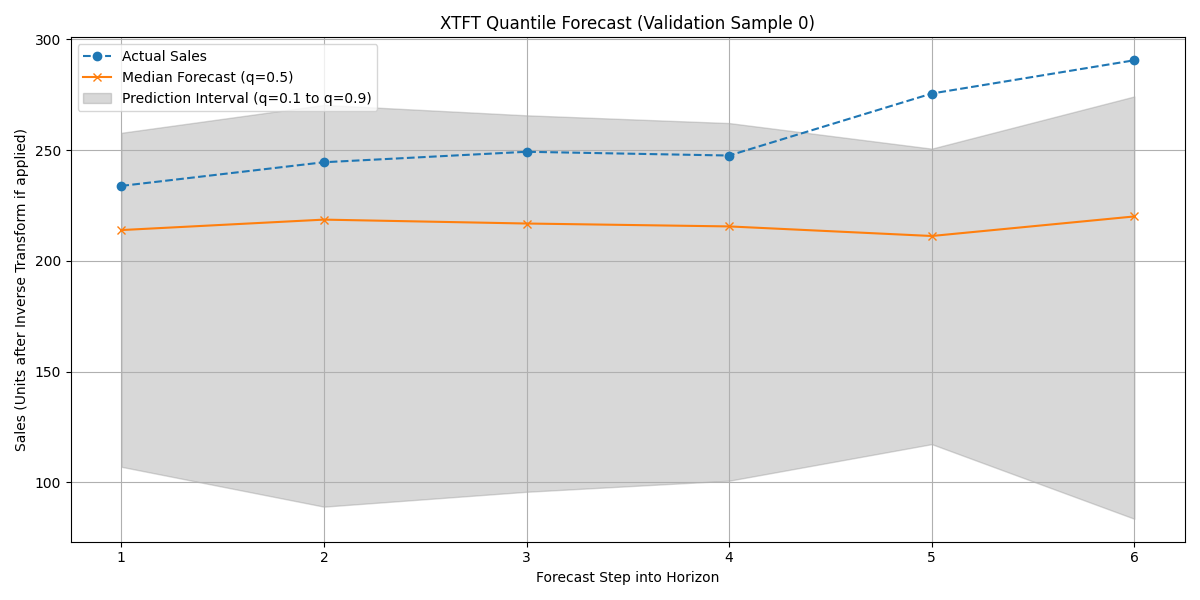
Visualization of the XTFT quantile forecast (median and interval) against actual validation data for a sample item.